USB Key AVR Programmer
2011/09/02 98 Comments
So, you saw some AVR microcontrollers and you decided they are cute (they really are!). If you choose to work in plain C what you need is just a toolchain (you probably have some package ready for your distribution), the avr-libc library, a programming software like avrdude and a hardware programmer!
While you can freely download all the software you need, including the source code, for the programming hardware you have to choose between buying a commercial programmer (either from Atmel or some third party) and building your own.
What I’m publishing in this post is my version of the popular USBasp, an open source USB AVR programmer design from Thomas Fischl.
My version is a USB key-like design, using many SMD parts and a very small PCB. You can take it with you everywhere!
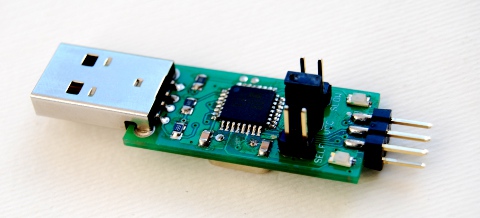
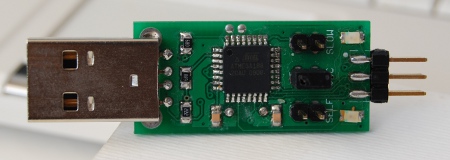
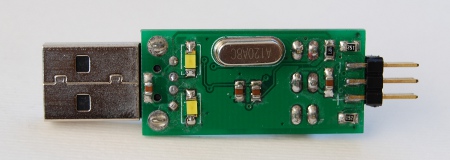
The microcontroller I used is an ATMega168-20AU, the SMD version with TQFP package. All passive components are in 0805 package, the clamping diodes are in SMA package, the USB connector is a PTH footprint (but an SMD one will fit fine) and the programming connector is side mounted.
Programming Header
There are currently two footprints for the programming connector of AVR controllers: the most common one, which is the one used in this design, is the one proposed by Atmel in the AVR910 application note.
The pinout is the following:

Please note that VCC pin can be used either to power the logic signal of the programmer at the correct target voltage (as it happens with the AVRISP mkII) or to power up the target hardware from the programmer itself.
Jumpers
This USBasp design, as the original one, provides a 2×1 jumper to send 5V power to the target, but there is an additional series resistor as a safety against short circuit.
Also, an additional 2×1 jumper is used for the initial programming and reprogramming of the device firmware. If you don’t have another programmer available and you need to program your first “smart” programmer, check out the parallel port BSD programmer (which was what I first used).
The third 2×1 jumper is used to manually select the low speed programming mode, which is what you need the first time you program an AVR device, as the default configuration for the microcontroller is to run at 1MHz, and the default programming speed of an USBasp is too high (the maximum programming speed is 1/4 of the system clock).
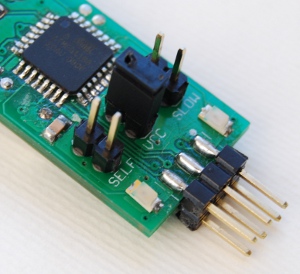
This jumper is not necessary anymore as the programming speed can be changed via software, using the -B flag of avrdude.
Other Information
The one drawback of this design is that it only runs at 5V, so you need a couple of clamping zener diodes to limit the USB signal voltage. If you can’t find the SMD diodes, try using some white LEDs, they should have the right voltage drop and it’s nice to see the lights on the USB traffic!
Also, you should only use this to program 5V devices… 3.3V ones should work but you would push the target logic well over its limits. It may work for some time, but don’t blame me if this sets on fire your latest-greatest-funkyest project! Anyway, I do that quite often. Just don’t tell anyone… Ok?
A final note is that this design is not firmware compatible with the Thomas’s one, as the GPIO pin mapping was changed to simplify the layout.

You can download my version of hardware and firmware for this design from GitHub.

The schematics in PDF version can be downloaded from here.

Happy programming!
Update!
The PCB is available on BatchPCB!


 fabiobaltieri
can i buy one from u? how much does it cost?
Hi Somesh!
Thank you for the request, but I’m not currently selling it. Maybe I’ll do that in the future if more people ask for it…
In the meantime, if you want to build one like mine, I suggest you to build the PCB on http://batchpcb.com/, they are really cheap and that’s what I’m using! The microcontroller and passive components can be bought on eBay (search for 0805 and 0603 kits). As for the rest I usually recycle components from old boards, but you can easily find everything online (like on Farnell or Digikey).
Alternatively, Thomas sells the components for his through-hole version, check out his website!
Cheers.
Nice work. I suggest you to use the AVRminiprog firmware, compiled for USBASB Hardware.
I have a single sided version for USBASB hardware that was placed inside a mint case https://picasaweb.google.com/lh/photo/4Hwhfr3F34Pf8XGblY6luw?feat=directlink
[]s
Danjovic
Interesting design! I like the idea of recycling stuff… that mint case is perfect for USB gadgets!
I’ll take a look at the AVRminiprog fw.
Thanks.
Hi,
Mine is inside a Mentos power-kiss case. Its dispenser is well sized for mini-usb, so I could make a programmer with detacchable cable, using ATMega88.
Rgds,
Massa
i have connected Atmega 8 hardware but is not responding. Kindly respond immidiatly
Rahul M
Hi, what you mean by “it’s not responding”? Are you trying program something or you are referring to the programmer itself?
Single-sided pcb with 3.3V LDO: http://electrotormentor.blogspot.com/2011/09/usbasp-avr-programmer.html
Hi! Here too, a miniature USBAsp
http://avrproject.ru/publ/instrument/usbasp_in_bascom/3-1-0-35
Hello
I saw your usbasp and I was wondering can I order from BatchPCB your design ? I like it very much and great work.
Hi!
Thanks for the comment, I published the design on BatchPCB and updated the post with the direct link.
Alternatively you can also download Eagle (the Freeware version is ok!), open the .pcb file and regenerate the gerber from that!
Cheers.
Wow! Such a brilliant post i will try to make this one and thanks a lot for share its PDF file with programming details.
Boa tarde,
sou do Brasil, antes de mas nada, obrigado.
estou querendo fazer uma interface usb que simule 10 teclas de um teclado normal abnt, você recomedaria que projeto já pronto?
Hi Breno!
From what I understood from google translator you want to build a 10 key USB keyboard… if that’s correct take a look to the HIDkeys project from obdev, that’s really simple 17 key USB keyboard based on the obdev V-USB firmware (the same used by the USBasp programmer).
Link: http://www.obdev.at/products/vusb/hidkeys.html
Bye!
How to install usbasp firmware to aTmega8 before it can be used?
Hi!
You need another programmer. What I used the first time was a parallel port programmer, which doesn’t use any microcontroller but just a parallel port connector and three resistors. You can find a link in the post!
Good luck!
Oh I see. In the folder “firmware” that u share, what file should i program to the ATmega?
The firmware folders contains the firmware source code, which you can use to firmware binary with the “make main.hex” command on a Linux system or (I think) with the gnuavr package on a windows system.
hi
Mr Fabio, sorry if my english is not good,
I want to ask, can I install the firmware using a usb programmer the other (such as USB ISP, not a parallel programmer), and can I use this USBasp to program the MCS-51?
and in fact I am still confused with the firmware (actually I am a newcomer to the field of microcontroller, and that’s why I’m asking a lot) ATMega 8 chip can accommodate flash memory up to 8 kb, but the firmware is too big I think, can you explain to me, please. …
thank you very much …
Hello Dhany,
of course, to program the firmware on the programmer you can use any other programmer! For the flash memory, the memory of the microcontroller of the programmer is only used to store the programming firmware, so you can program any ISP-based AVR with it, independently by its flash size.
As for the MCS-51/8051, this programmer can only be used on Atmel AVRs with an ISP interface, so you can’t use it on anything else, and while in principle you can modify it to support other MCUs, this is going to be a pretty big effort if you are a newcomer.
Hopes it helps!
thanks, it would be helpful
but I am still confused with the firmware, atmega 8 can accommodate up to 8 kb flash memory, but the size of the firmware, I see 11 kb, whether atmega 8 can accommodate firmware exceeds its memory capacity ?
How are you checking the firmware size?
In my build the .hex file is 11kB, but that file is in Intel HEX format, so you have to use avr-size to check the size of the binary code in it, which in my case is little less than 4kB, as in:
$ ls -l main.hex
-rw-r–r– 1 balto users 11002 Dec 24 14:58 main.hex
$ avr-size main.hex
text data bss dec hex filename
0 3902 0 3902 f3e main.hex
Of course, if the output of avr-size is more than 8kB, the firmware cannot fit an ATmega8, but that should not be the case for usbasp… in fact it should fit also on an ATmega48!
i have plans of building the fischl circuit before that i want to be sure if it can do the job.
can this programmer burn the at89c2051 mcu?
i not sure because i saw programmers that can only program at89c2051.
they also say that at89c2051 don’t support ISP.
Hi Andryan,
Atmel AT89 series microcontrollers are 8051 based (so they are *not* AVRs), and they cannot be programmed using the usbasp firmware/hardware. I’ve never used one but looking at the datasheets the at89c2051 can use only high voltage programming, so it’s very hard to program that one in-system. Other chips of the family have a serial bootloader, which I think you can use with the FLIP software from Atmel and a generic USB-serial converter.
Bye.
Hello,
I have built Your device using PCB from BatchPCB, Your firmware and Atmega8-16AU. Successfully programmed bin and fuses. When i’m inserting it into PC (Linux) i see:
[ 8289.244101] usb 6-1: new low speed USB device number 68 using uhci_hcd
[ 8289.368124] usb 6-1: device descriptor read/64, error -71
[ 8289.596104] usb 6-1: device descriptor read/64, error -71
[ 8289.812105] usb 6-1: new low speed USB device number 69 using uhci_hcd
[ 8289.936073] usb 6-1: device descriptor read/64, error -71
[ 8290.164674] usb 6-1: device descriptor read/64, error -71
[ 8290.380108] usb 6-1: new low speed USB device number 70 using uhci_hcd
Where can be the problem?
Hi Viks,
I’ve had similar problems with certain PCs when using the clamping diodes on the USB D+/D- lines. Currently I only use White LEDS (the one in broken laptop LCDs are good!) in place of clamping diodes and they seems to work better.
Can you try to swap that components for something else?
I will try at the end of this week.
Soldered 2 blue leds instead of zenner diodes. Now leds blinks when inserting into USB, but device is still not detected.
After insertion one blue led is on an other is off. Voltage on lit led is 2.65V (when using zenner diodes voltage on sam led is 2.92V).
That’s strange… are you using the correct values for the fuse bytes? The one in my Makefile are for the ATMega168 but the lfuse and hfuse bits are different in the ATMega8…
Anyway, the led behavior seems ok… I’ll check the voltage values on my board tonight!
I used fuse values for atmega8 from comments in Makefile.
TARGET=atmega8
HFUSE=0xc9
LFUSE=0xef
Looks correct… I mine samples does 2.6-2.7V on the bus when idle (led lit) and works correctly with ATMega168-20AU and firmware as on my github.
I have an ATMega8-16AI laying around… I’ll try to mount it on one board just to check if it works in next days.
Is this ok for Atmega8 to be clocked at 12MHz?
That’s ok, you can try to change or remove the load capacitance if you suspect problems with that.
Anyway, I put an ATMega8-AI on one of my boards this morning, in the firmware I just used TARGET=atmega8
HFUSE=0xc9
LFUSE=0xef
rebuilt the firmware, reflashed and it works correctly. Are you sure you rebuilt the firmware after changing TARGET to atmega8? The makefile is not safe for changes and you have to manually issue a “make clean” after any change…
I have changed Makefile before building anything.
Can You send me compiled firmware?
Sent!
Thank You very much! Flashed Your firmware. Now USB device is detected. Seems like there was something wrong with compilation. At least now i know where to dig.
Good to know!
You can try to build a toolchain from sources, I think mine is built with these instruction:
http://projects.qi-hardware.com/index.php/p/ben-wpan/source/tree/master/atusb/fw/README
Cheers.
Thank you for your great job.
will you send me hex file for Atmega8. I have problem making it for Mega8.
Hi!
Just committed the binary images for ATMega8 and ATMega168 into the GitHub repository in the binaries/ directory… pull it out!
Thank You very much!. hope to to put it together this weekend.
usb device not recognized, what should i do?
Checkout prebuilt firmware images and voltage level on USB lines!
and do not forget to flash fuses with ‘make fuses’ (using correct values in Makefile)
Hi,
Does it works with ATmega328P?
Of course it does! As with the original USBasp project, it works with any ISP-based AVR (which just excludes ATtiny4/5/9/10 AFAIK).
For newer microcontrollers you just need a recent version of avrdude or else you have to manually add the ISP configuration in the avrdude.conf file using the ISP parameters in the datasheet.
I there,
I meant to use the ATmega328P in your project instead ATmega8 or 168 (wich you provide the HEX files).
Oh, I see. That’s ok too, you just need to change the target in the Makefile and rebuild the firmware!
hello sir, remember me, I Dhani
sorry if my english is not good
I want to ask, I want to make USBasp and I’ve bought a new ATmega8 microcontroller, the microcontroller I ask is that I bought it was the setting of his factory, (1 MHz internal clock source, so that I know) I want to change its clock to external 12 MHz, if I want to program it, if an external crystal and then plug it directly in the program, or whether the program at first, and its crystals in pairs,
I am afraid my microcontroller was damaged when the wrong way, because it’s new microcontroller
thank you for your explanation
I am waiting for your reply
Hello Dhany,
most AVRs works at 1MHz by default (USB ones are one exception), if you change LFUSE to work with an external crystal that’s also going to be used during in-system-programming, so you always need to have the crystal connected to the MCU in order to program it.
If you have misprogrammed the LFUSE byte, it’s probably possible to reprogram the chip by feeding a slow external clock to the XTAL1 pin and slow down the external programmer.
If the new microcontroller is mounted on the board with the crystal connected, just reprogram the fuse to the correct one (doublecheck on the datasheet if you are not sure!) and you will be good to go!
Thank you sir, your explanation really helped me, now I can try it without fear of making a microcontroller is faulty
once again thanks a lot, can I ask again if there are other difficulties, or something I do not understand?
You’re welcome… just google before asking! ;-)
o, I even forgot to google, thanks for reminding
ask a more experienced person would be more helpful, but work alone, it is easier to gain experience
once again thanks a lot ……
Hello sir, I’ve managed to make USBasp. I use ATMEGA8A, does it matter? because in the scheme using ATmega8.
After installing the driver, then I try to program the ATmega8, I use khazama avr programmer, I could read the signature ATmega8, but when I try to read flash to buffer, a message appears like this
Error while operating…
——————————————-
:AVR device initialized and ready to accept instructions
Reading|
###########################################################|
100 % 0.20s
:Device signature = 0x1e9307
:reading flash memory:
Reading | : error : usbasp_transmit: libusb-dll:err [control_msg] sending control message failed, win error: The I/O operation has been aborted because of either a thread exit or an application request.
where is the problem? on its USBasp, or on the target hardware? or even the driver, because when I tried on another PC, the problem remains the same
Thank you,
I was waiting for your help, sorry if my comment is too long
Hi Dhany,
The ATmega8A is ok, you should be able to use my prebuilt ATmega8 hex on it.
Your error looks like a communication error with the programmer. What are you using to program the ATmega8? (I mean which hardware programmer?).
You mean the ATmega8?. after making USBasp (I use ATMEGA8A) and it worked. I tried to program the ATmega8, I could read the signature, but when trying to read a flash, a message appears as I write.
I don’t understand what are you trying to program with. I mean, what hardware programmer are you using that gives you that error? Are you trying to program usbasp’s microcontroller or are you programming something with an usbasp?
Sorry, if my explanation is less understood.
I tried to program a new microcontroller with USBasp.
And an error message that I saw yesterday, it’s because I forgot to set the jumper to slow SCK. Sorry it’s all my fault, and firmware USBasp from you, it works well. Once again thanks a lot and
sorry, I’m asking too much.
No problem… I’m glad it’s working, have fun with it! :)
I have the same problem with you.. Can you help me please ??
Thanks, this is great, I can start experimenting with this
Hi,
Can I use this firmware and schematic to build my own version and sell it commercially?
Hi Nataraj,
my schematics/layout (as the rest of non-software contents of my blog BTW) are distributed under creative commons attribution share-alike, which means that you can use it commercially as long as you redistribute the modified files with the same license and cite the source. More on this on http://creativecommons.org/licenses/by-sa/3.0/.
The software and firmware are under GPL, which means that you can use it and modify it as long as you distribute the modified sources together with the binaries. Again, more on: http://www.gnu.org/licenses/gpl.html.
Basically this means yes, but you have to distribute design files of everything you sell.
Fabio
What about USB driver license?
https://github.com/fabiobaltieri/usbasp-key/blob/master/firmware/usbdrv/CommercialLicense.txt
That’s GPL too but obdev.at offer commercial licensing, see: http://www.obdev.at/products/vusb/license.html
thanks for clarifying the licensing
Thanks a lot. It is because of people like you, open source and free source is easily available. If I do it, certainly I will share under the same license you have done. Thanks
You’re welcome!
hello,, i want to ask,, why i cannot open your file,, usbasp.brd and usbasp.sch ?? i opened it using Software EAGLE Version 5.6.0 for Windows – Professional Edition
,, thx for your help :)
Hi,
board and schematics files are in Eagle 6.1 format (Eagle changed file format from version 6.0, current ones are XML based).
I want to make this programmer.
How to set fuse bits of ATMEGA8 0xC9 and 0xEF in progisp software ?
I have seen firmware which can make able this programmer to program 8051 mcus at http://www.circuitvalley.com/2011/06/usb-8051-avr-microcontroller-programmer.html
Can you please test that firmware for me.
Thanks in advance.
Hello Meet,
fuses are not a problem but that firmware is not going to work on my design as the author only distributes the compiled code and my schematic is slightly different. If you want to use that firmware, I suggest you to also use that hardware design.
Hi fabiobaltieri,
What is difference between Bootloader and Programmer ?
If i use your schematic then first i burn firmware or fusebit?
If i use another usbasp to program atmega8 for my usbasp then how i connect it ?(Which pins of usbasp connected with which pins of atmega8.)
Thanks for quick response.
The bootloader is a porting of BootHID to my design, you can use it to self-program the device, fuses are the same a part from the bootaddr bit.
For the normal programming, fuse/firmware/bootloader order does not matter, but I suggest you to burn fuses first time and not touch them again. Refer to my README.md for that.
The connection between programmers and programmed device is 1:1 (MISO-MISO, MOSI-MOSI etc…) but you have to short the self-programming jumper.
Hi fabiobaltieri,
In Datasheet of AVR MCU there is bar on RESET, which is not in 8051 MCUs. What mean that ?
What logic is given on RESET pin of 8051 and AVR MCU for programming ?
I’m asking too much. Sorry for that.
The bar over the signals indicates that the signal is active low, so theoretically that means that the 8051 reset is active high (where high refer the actual voltage level respect to the actual logic’s threshold).
I have no idea on that details for Atmel’s 8051 as I never used them… you should ask the author of the programming firmware.
Can i use atmega 8L instead of atmega 8 ?
Can it cause any problem due to 12Mhz Crystal and 5V voltage of usb supplied to atmega8L?
5V should not be a problem for the ‘8L, but you are far outside specs for the frequency, as that’s only guaranteed for 8MHz. It may work, but you can’t rely on it.
Can i program fusebit of AVR mcu to use external crystal without connecting external crystal while programming?
Yes but once you burn the cksel bit you can’t reprogram the mcu anymore until you actually connect the crystal, as that setting is also used by the programming logic.
So, if you do that, be sure to burn at least that bits as last.
First of all, thank you so much for this design, it is by far one of the best I’ve seen. I am currently breadboarding a USBASP programmer based on your design, except using the ATMega328p. I have calculated the new fuse bits and changed the makefile to reflect this, but when running “make main.hex” it just spits out a bunch of errors and doesn’t work. I’m using OSX 10.8.2, and I’d be happy to show you the errors. Any ideas?
Thank you,
Jordi
Hello Jordi,
there are many things that can go wrong with V-USB devices (specially with the 5V design and USB 3.0 hosts in my experience), but I have really no idea where to look for on Mac OS systems… You should try asking in the avrfreaks forum, there are many AVR/OSX developers out there and they know for sure how to help! Make sure to post some details of your setup, the command line you are using and the output of the program.
Fabio
Hello,
I booted up Windows 7 and tried doing the same thing, and it worked perfectly! It left me with a few files, among them main.hex, main.map, and main.bin. I know that main.hex is the firmware I need to actually flash, but I am a bit confused as to what the other two files are. Do I need to do anything with them?
Thank you,
Jordi
Great!
main.bin is the same as main.hex, just in binary format, while main.map file contains the symbol table and other stuff useful if you need to figure out what the linker is doing (open it with a text editor and see for yourself).
Fabio
Oh, by the way, did you boot up on Windows on the same Mac or are you talking about a different machine?
Ah, I see what you’re talking about with the files, thanks! And yeh, I have Windows 7 installed on bootcamp on my mac.
Ok, this is really strange… I just tried plugging my usbasps in a Macbook Air I have here and the device gets enumerated correctly, but I have to tell you that one is hacked to work at 3.3V and the other is using two white SMD LEDs in place of the zener diodes (white LED drops about 3V).
Actually I remember having a lot of problems last time I used zener, and lately I’m only doing 3.3V designs. You should give it a try if you have some white (or even blue) LED laying around.
Fabio
Pingback: Atmel-Regler flashen | ähm… dings!
hello
im interesting to your design
may i ask
the white amphenol that you use 3×2 what the type it is?
from 3×2 amphenol to 5×2 amphenol
is the format like this?(after coupling from 3×2 to 5×2)
o o o o o
vcc gnd gnd gnd gnd
o o o o o
mosi reset sck miso
Hi,
I’m not sure I understand the question, anyway the 3×2 connector is a standard 2.54mm strip header, and that’s used on many AVR boards, as it’s the one specified by Atmel in the AVR910 application note. The pinout is in the post, to use the 5×2 version you have to make yourself a converter like this one: https://www.sparkfun.com/products/8508.
Fabio
thx fabio^^
what PC software do you use for uploading the hex file? thanks
Hi, avrdude, I think it’s the most used out there.
can I upload USBasp firmware using another USBasp ? thank you
Sure! Once you programmed the first one you can use it to program others.
Can you make one for me?
Hi Jonas, I don’t have plan building more on these, sorry!
I wanted to buy 25 pcs. But it does not exist.What a bloody shame.
Hey Michael, there are plenty of similarly designed AVR programmers on eBay these days if that’s what you are looking for.